
We're excited to share the latest updates and developments with NetBird since our previous newsletter.
NetBird for Microsoft Intune
NetBird integrates seamlessly with Microsoft Intune to enforce device compliance, ensuring only managed and secure devices can access critical resources in your network. Extends Zero Trust principles to the device level and reduces your attack surface with secure, controlled and protected access that meets your organization’s policies.
Learn more: Deploying NetBird with Intune | Allow Only Intune-Managed Devices to Access Your Network
NetBird for SentinelOne
NetBird integrates with the SentinelOne Singularity™ platform, enabling real-time endpoint security posture as a core component of your network access policies. This integration elevates your Zero Trust architecture by ensuring that only healthy and compliant SentinelOne managed devices can connect to your resources. Stream NetBird network activity events to SentinelOne Data Lake, and correlate network connectivity events with endpoint security data for comprehensive threat detection and investigation.
Learn more: Restrict Network Access with SentinelOne Singularity™ | Stream Network Activity to SentinelOne Singularity Data Lake
NetBird Control Center
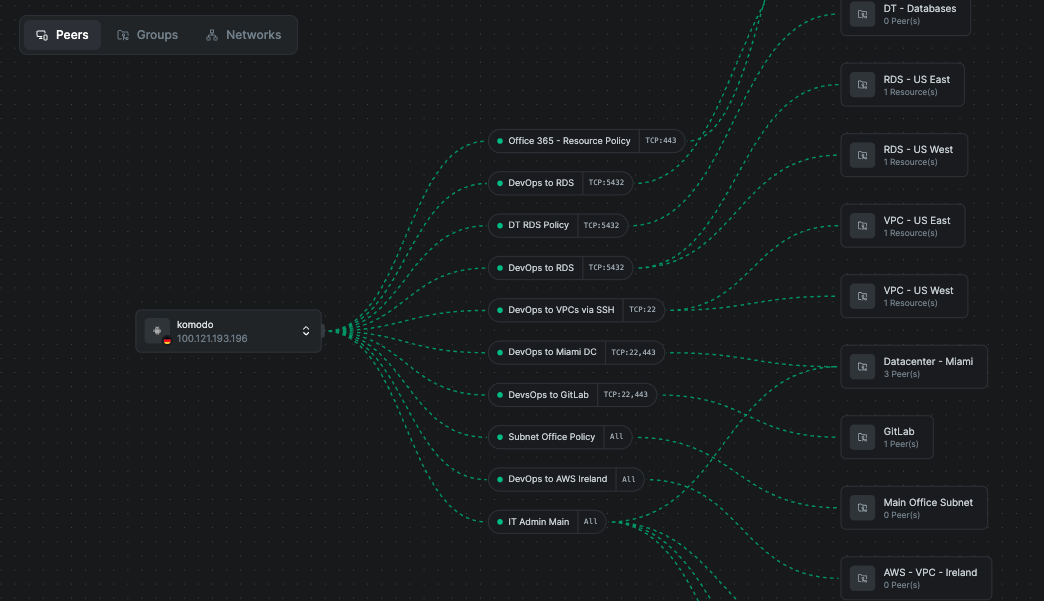
The Control Center is NetBird's centralized visualization dashboard that provides a comprehensive view of your network infrastructure. It enables administrators and network operators to visualize, monitor, and troubleshoot their NetBird deployment through an intuitive graphical interface.
NetBird-Acronis Webinar for MSPs: Shrink the Blast Radius
In case you missed our recent webinar, the full recording is now available on demand. In this session, we explored the critical impact of lateral movement and how modern ransomware can devastate business operations and reputation. Watch the recording to learn how a multi-layered defense strategy paves the way for effective prevention, detection, and disaster recovery readiness, and see how the integration of NetBird and Acronis works to contain these evolving threats and protect your business.
On-demand: Watch the recording
The ULTIMATE Proxmox Guide - Post-Install, ZFS, GPU Passthrough, and more!
Watch this video covering the basics of getting Proxmox up and running, setting up an LXC container with NetBird for remote connectivity, and diving into some more advanced tips and tricks such as setting up a ZFS pool and enabling IOMMU for GPU passthrough.
Learn more: Proxmox VE for Beginners Guide with NetBird LXC
That’s it for this month’s newsletter! Thank you for being part of the NetBird community. Stay tuned for more updates!
– Team NetBird
Check out the changelog to stay on top of all the product releases. Follow NetBird on LinkedIn